How to open links in a new tab
⚠️ The markdown parser bundled within the plugin Markup Markdown is using the extended version of the markdown syntax called “Markdown Extra” (not kramdown)
Attributes with the relatives values are used within brackets
[Markup Markdown Plugin](https://www.markup-markdown.com){target=blank rel=nofollow}and will be rendered as :
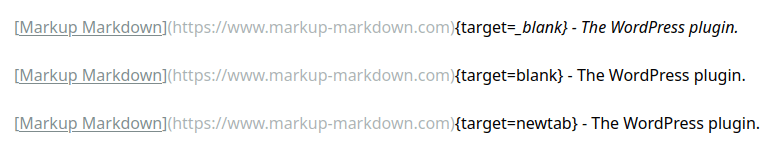
<a href="https://www.markup-markdown.com" target="blank" rel="nofollow">Markup Markdown Plugin</a>The JavaScript editor on the edit screen does not support every feature of the advanced syntax so using the standard keyword _blank will trigger the italic rendering until the end of the line. ????
A workaround is be to use your own frame name like blank or newtab for example:
How to enable or disable markdown with custom post types
You can force disable the markdown feature for a specific custom post type with the following snippet :
add_action('init', function() {
   remove_post_type_support( 'your_cpt_slug', 'markup_markdown' );
});
You can easily enable the markdown feature for a specific custom post type with the following snippet :
add_action('init', function() {
   add_post_type_support('your_cpt_slug', 'markup_markdown');
});
To find out more about using the markdown feature with custom post types, please refer to the in-depth Setting Custom Post Type tutorial.
How to use styles and scripts inside your post
A vulnerability has been reported earlier this year allowing contributors or editors to perform malicious actions. No worries at all, this is mostly a concern if you are using community features like a forum. Please upgrade to the latest version of Markup Markdown if need be ????
style or script tags anymore inside your post content. For specific user cases, please refer to the Enable styles and scripts in your posts tutorial.